Welcome to the IBM Websphere Commerce Hub


Welcome to the IBM Websphere Commerce Hub

Come join me in my journey to explore the various features and capabilities of IBM Websphere Commerce and understand how retailers can benefit from its really cool out-of-box functionality.

Showing posts with label websphere. Show all posts

Tuesday, May 26, 2015

Commerce Composer in a Nutshell

A excellent video to learn about the amazing Commerce Composer tool - which enables business to create new pages without IT assistance. Available FEP7 and above.

Not only does it allow the business to control - how the page looks but also enables them to add SEO metadata contents for improved search capabilities and associate search terms which lead to the display of the page.

 http://www-01.ibm.com/support/knowledgecenter/SSZLC2_7.0.0/com.ibm.commerce.management-center.doc/demo/PageComp/PageComp.html


Monday, April 7, 2014

Debugging BOD Framework

Important Trace Strings to debug BOD


BOD Request / Response:  

com.ibm.commerce.foundation.server.command.bod.*

Data Service Facade Trace String: 

com.ibm.commerce.foundation.server.services.dataaccess.DataServiceFacade 

Get Service Flow Trace Strings:

Useful to understand if the code is breaking midway and if you would like to enable tracing for individual commands.

Fetch<ComponentName>Cmd 

The first point to debug the Get / Search service failures. 
The Fetch command fetches the data.Extensions of this Fetch command are associated with a particular XPath expression.The command framework can use the XPath expression and Fetch task command to resolve the Get request to a particular implementation by using the existing WebSphere Commerce command registry (CMDREG) data. Instead of having one implementation for a Fetch business task, the command framework uses the XPath as the selector to resolve the implementation. If a specific implementation is not defined for the given XPath, then a default Fetch is used.

For example , The InventoryAvailability noun uses a default Fetch implementation and to debug , you must enable the trace for :


com.ibm.commerce.inventory.facade.server.commands.FetchInventoryAvailabilityForDKCmdImpl
 
Compose<ComponentName>Cmd 

The Fetch Command calls the Compose commands to composes the response.When the Get command calls the Compose command, it uses the access profile of the request as the key to select the appropriate Compose implementation. Because the access profile is just a superset of another access profile, the Compose commands delegates to the parent access profile to first populate the logic model and add any required information.

For example , The InventoryAvailability noun uses the below Compose implementations and to debug , you must enable the trace depending on the Inventory system used :


DOMInventorySystem com.ibm.commerce.inventory.facade.server.commands.ComposeDOMInventoryAvailabilityForDKInBatchCmdImpl

NonATPInventorySystem
com.ibm.commerce.inventory.facade.server.commands.ComposeNonATPInventoryAvailabilityCmdImpl

ATPInventorySystem
com.ibm.commerce.inventory.facade.server.commands.ComposeATPInventoryAvailabilityForDKCmdImpl
 
ReadBusinessObjectMediators 

The read mediator constructs the logical object based on the values in the corresponding physical entity.The Read mediators can be found by looking at the below file:


/WC/xml/config/<component-name>/wc-business-object-mediator.xml


For example , The InventoryAvailability service debugging , enable the trace for the below :
com.ibm.commerce.inventory.facade.server.services.dataaccess.bom.mediator.ReadInventoryAvailabilityMediator  
If you do not wish to enable the trace on a granular level , you could also enable the trace for the entire component service.

For example , for Inventory services , enable the below trace :
com.ibm.commerce.inventory.facade.server.*

Debugging Query Template File


XPATH Syntax Validator (wcs_xpathkey utility):

The XPath key generator command-line utility takes an XPath expression as input and generates an XPath key. This key is used to locate the XPATH_TO_SQL_STATEMENT template in the query template file.This utility can help you validate the format of the XPATH Key as well such as missing closing brackets etc or misplaced tokens. Please note this would not however match the XPATH with the actual Noun definition.

wcs_xpathkey MyXPath
For example:
wcs_xpathkey /CatalogEntry[(@catalogEntryTypeCode='ProductBean' 
  or @catalogEntryTypeCode='ItemBean') and 
   ParentCatalogGroupIdentifier[ExternalIdentifier[GroupIdentifier='Coffee Table']]]

The output from this command , if sucessful, would be:
/CatalogEntry[(@catalogEntryTypeCode=) and 
   ParentCatalogGroupIdentifier[ExternalIdentifier[GroupIdentifier=]]]

In case of failures , would display certain error messages.

Query Template File Syntax Validator

Use this page to validate your query template file syntax.
http://localhost/webapp/wcs/admin/servlet/dsl.jsp

In case you are seeing NullPointer exceptions on querying even the OOB services, make the below changes in the dsl.jsp.

Search for the below line:
sc.setXPath(sbQuery.toString());

Add the following line of code below the above line:
sc.setComponentId(componentId); 

Reloading the configuration of a BOD service module

During development, you may want to modify and reload configuration, without having to restart the server. Follow the below Infocenter link  for more details:


http://pic.dhe.ibm.com/infocenter/wchelp/v7r0m0/topic/com.ibm.commerce.developer.soa.doc/tasks/tsdreloadconfig.htm

Wednesday, March 26, 2014

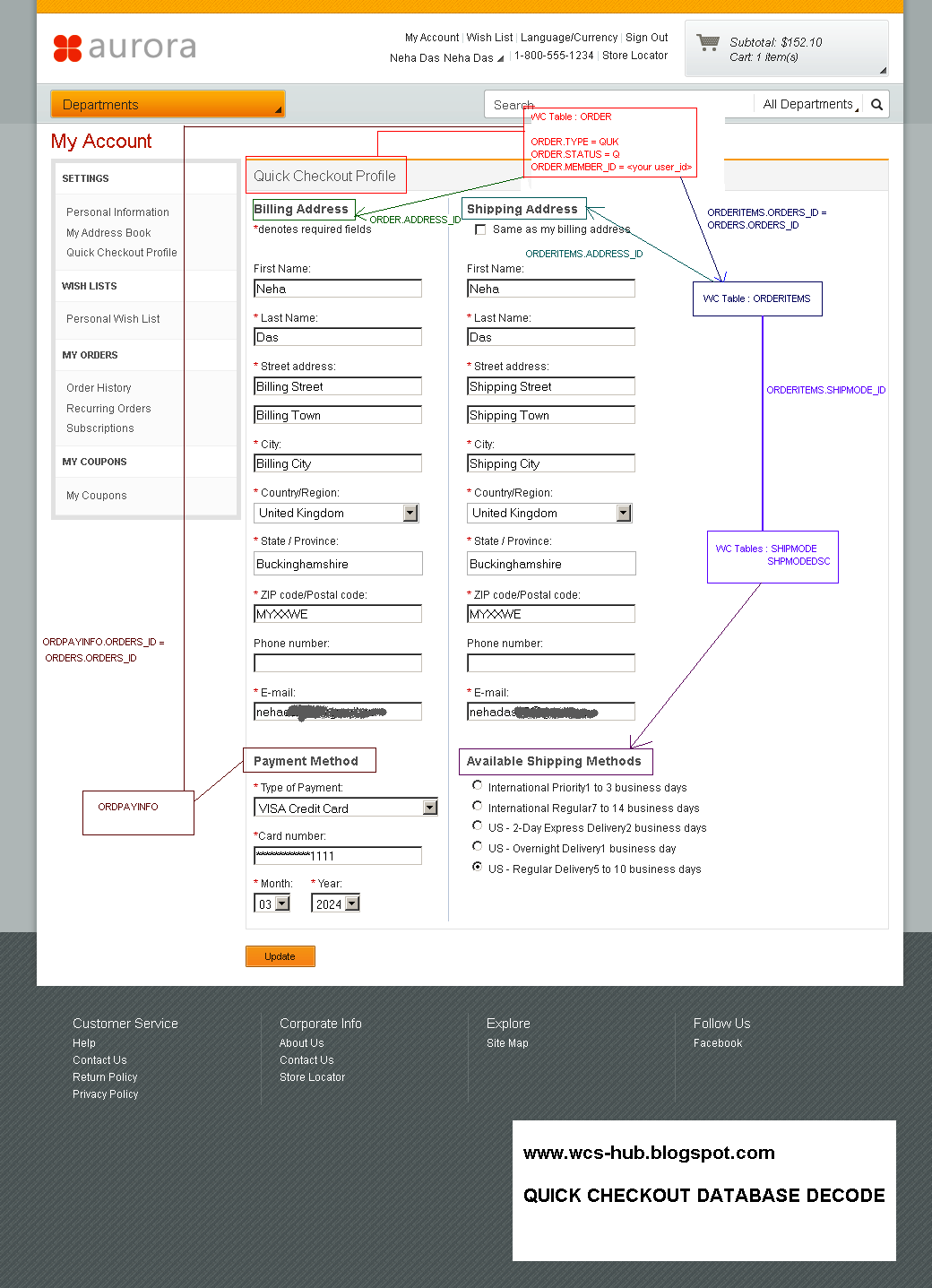
Quick Checkout : Database Decode

Ever wondered what does Order with status "Q" and type "QUK" implies? Where are the Quick Checkout profile information stored in the WCS Database?

Check out the below diagram for the details:


Friday, June 7, 2013

WebSphere Commerce Search Cookbook


The IBM Support blog, called the 'Commerce Search Cookbook' covers common customizations requested by customers.

https://www.ibm.com/developerworks/community/blogs/CommerceSearch/?lang=en


This is a great reference  point for SOLR issues and solutions - so sharing with the readers.

Happy Exploring!

Wednesday, November 21, 2012

WC Search Customizations - Introducing new facets

Faceted search is the dynamic clustering of items or search results into categories that let users drill into search results (or even skip searching entirely) by any value in any field. Each facet displayed also shows the number of hits within the search that match that category. Users can then “drill down” by applying specific contstraints to the search results. Faceted search is also called faceted browsing, faceted navigation, guided navigation and sometimes parametric search.


One of the common customization scenario is to introduce custom attributes as facets. The following should guide a developer through the process:

Important SOLR Configuration Files

Location : <WCDE>\search\solr\home\MC_<master_catalog_id>\en_US\CatalogEntry\conf

1. schema.xml
Introduce a child element "field" for the element "fields" for CATENTRY.FIELD1.

Place it at the end of the attributes under "Catentry's basic attributes" for logical grouping

<fields>
 <!--
   Catentry's basic attributes: map to table CATENTRY
   -->
<field name="catentry_id" type="long" indexed="true" stored="true" required="true" multiValued="false"/>
.
.
<field name="catenttype_id_ntk_cs" type="wc_keywordText" indexed="true" stored="true"  multiValued="false"/> 
 <field name="field1" type="long" indexed="true" stored="true" multiValued="false"/>

where ,
indexed: true if this field should be indexed (searchable or sortable)
stored: true if this field should be retrievable

multiValued: true if this field may contain multiple values per document

2. wc-data-config.xml
We will update the queries that are used to populate the Solr index from the WebSphere Commerce database tables. Each query needs to retrieve the data stored in field1 of the CATENTRY table.The wc-data-config.xml file loads catalog entry data in three separate parts. Product data is loaded first. This is followed by bundle data and finally all other catalog entry types. For each of the three sections there is a query for populating the full index and another query for delta updates. For each section (product, bundle and other), we need to update the two queries and then add a new field element to assign the data from the WebSphere Commerce database to the field1 field in the Solr index. All together there are nine updates you need to make to this file.

The modified file can be downloaded from here. Search "FIELD1" in the downloaded file to know the modifications required.


Important Database Tables
SRCHATTR

SQL updates required

insert into srchattr (srchattr_id, indexscope, indextype, identifier) values ((select max(srchattr_id)+1 from srchattr ) , '0', 'CatalogEntry','_cat.Field1');

insert into srchattrprop (srchattr_id, propertyname, propertyvalue)
values ((select max(srchattr_id) from srchattr ),'facet','field1');

Here , propertyvalue ' field1' is the name specified in the schema.xml

Also, srchattr_id should match in both the above queries

Code File Changes


1. SearchFacetsDisplay.jspf
Location : /Stores/WebContent/Madisons/Snippets/ReusableObjects/
This JSP fragment loops through the available global facets and includes another JSP fragment to display each facet’s data.We will introduce code to display the facet data for field1 in the left sidebar.

Search for the below <c:otherwise> tag and introdule the below code before the tag:

<c:when test="${facetField.value eq 'field1'}">
         <%@ include file="../../Snippets/Search/Field1FacetDisplay.jspf" %>
         <c:set var="f" value="${f + 1}" />                   
</c:when>

We will create  "Field1FacetDisplay.jspf" in the next step.

2. Field1FacetDisplay.jspf
Download the file from here and place it in the location "/Stores/WebContent/Madisons/Snippets/Search/".

Republish and Test!

Demo Video
Coming shortly

Friday, November 2, 2012

Saturday, September 22, 2012

Aurora - Watch out Madison! ;)

Aurora - is the new starter store launched with WCS 7 FEP 5 - it has really sleek and neat look.
Though it looks like it is still in the nascent state and does not support all the features which are available in the Madisons store - but I am sure we will see her growing fast.

Looks like Madisons has a competition in the B2C space. ;)

To read more about Aurora , refer the below link :
Aurora Starter Store

Catch the below video to know more about Aurora :


References :
Bob Balfe - blog.balfes.net

RESOLVED : DB2 9.7 setdbtype createdb issues


Issues Faced during the database creation while executing the setdbtype.bat

When we checked the “reorgdb2.err.log”, we found the few of the packaged failed during the reorg operations and we can find errors similar to below in the log file:

SQL0551N: The user “XXXXXX” does not sufficient priviliges to rebind the package 'SYSIBMADM.P201372405' of database 'WCS7DB'. UniqueId=213123…..

Problem (Abstract)
In DB2 Version 9.7, a user who holds SYSADM authority no longer has implicit DBADM authority and therefore has limited capabilities compared to those available in Version 9.5.  

Symptom
Example authorization errors are SQL1092N, SQL0551N and SQL0552N:
SQL1092N
authorization-ID does not have the authority to perform the requested command or operation.

SQL0551N
authorization-ID does not have the required authorization or privilege to perform operation operation on object object-name.

SQL0552N
authorization-ID does not have the privilege to perform operation operation.
 
Cause
Prior to DB2 Version 9.7 a user with SYSADM authority had implicit DBADM authority. Common configurations have the instance owner account as a member of the SYSADM group. Applications that are run under the instance owner account had unlimited authority on the database.
In DB2 V9.7 a user with SYSADM authority no longer has implicit DBADM authority. As a result any applications that are run under the instance owner account might experience authorization errors when trying to perform operations that are no longer within the scope of a SYSADM.
 
Environment
The UPGRADE DATABASE command and the RESTORE DATABASE command (for a downlevel database) grant DBADM authority to the SYSADM group, however this is not the case for any new V9.7 database.


Resolving the problem
The resolution to the errors is to verify the authorities for the userid.
To get the list of authorities held by the instance owner authorization ID perform these steps:

1.       Use the SYSPROC.AUTH_GET_INSTANCE_AUTHID() scalar function to determine the instance owner authorization ID.
For example:

VALUES SYSPROC.AUTH_GET_INSTANCE_AUTHID()

1
-----------------------------------------------------------------
XXXXXX

1 record(s) selected.

2.       Get the list of authorities for this authorization ID.
For example:
SELECT * FROM
TABLE (SYSPROC.AUTH_LIST_AUTHORITIES_FOR_AUTHID (XXXXXX, 'U'))AS T
ORDER BY AUTHORITY

3.       Grant any missing authorities.
For example:
GRANT DBADM ON DATABASE TO USER XXXXXX
Connect to database using db2admin/password and then execute the above grant query.

4.       Execute a reorg for the entire database.
1.       Run the db2cmd
2.       Navigate to the WCInstall_Dir\bin
3.       Execute the following command
reorg.db2.bat databasename username password schemaname
Example:
reorg.db2.bat WCS7DB xxxxxx passw0rd XXXXXX
4.       Monitor the “reorgdb2.err.log” to ensure there are no errors.

Reference Link:
http://www-01.ibm.com/support/docview.wss?uid=swg21385801